


Q4 2025 PRODUCT UPDATE: AI-powered terms explanations, new file management module, and more
This quarter’s updates are all about making your workday easier and more efficient. From AI-powered terms explanations in WORKAI® Buddy to the new WORKAI® Assets – a smarter way to manage files across the platform – we’re introducing tools that support clarity, consistency, and speed.
You’ll also find smarter search results (now ranked by relevance and freshness), unified notifications, a redesigned Saved Items panel, and personalized homepage pop-ups.
Want to see it all in action? Keep reading or click here for a detailed update.
AI-powered terms explanations with WORKAI® Buddy
For whom: All users
Use case: Instantly understanding unfamiliar terms while reading intranet content.
Description: We’ve added a new capability to WORKAI® Buddy that makes reading and learning easier across your intranet – AI-powered terms explanations. When enabled, this feature uses AI to detect and explain complex terms found in published content.
Difficult concepts are automatically highlighted on the page, and with just one click, users get clear, contextual explanations based on existing knowledge stored in your WORKAI® platform.
For example, when reading an onboarding guide, a new hire might see the term “OKR” highlighted. Clicking it reveals a short explanation of the term, pulled directly from the internal glossary or relevant intranet pages, without needing to search or leave the page.
AI-powered terms explanations improve knowledge accessibility, support self-service learning, and help all employees, especially newcomers, better understand internal language, acronyms, or technical jargon.
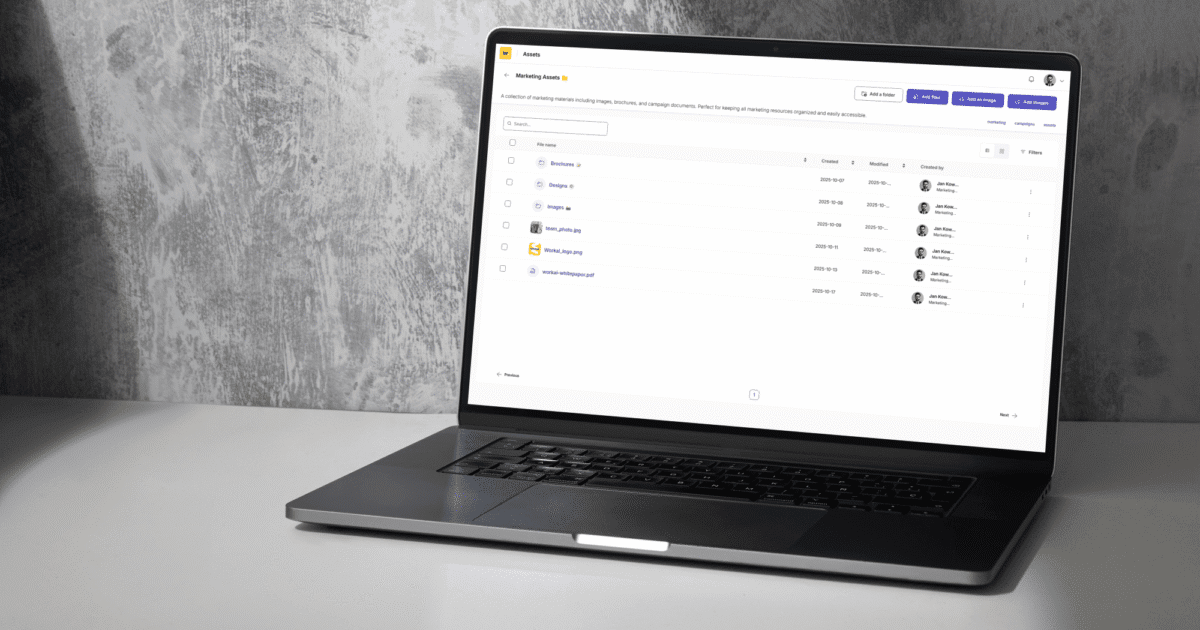
WORKAI® Assets, the new file management module
For whom: Administrators, Editors, and Publishers
Use case: Centralized storage, search, and reuse of files across all WORKAI® modules.
Description: Managing files across different modules and channels often means wasting time searching for the right version, duplicating uploads, or losing control over who has access. That’s why we’ve introduced WORKAI® Assets, the new module that brings order, speed, and automation to how files are handled in WORKAI®.
This centralized and secure system allows teams to upload, organize, and reuse files in one shared library accessible across all WORKAI® modules. Each file includes automatic versioning, so when one is updated, all linked instances refresh instantly, from the intranet and knowledge base to newsletters and learning materials.
With Azure AI Search, users can find what they need in seconds, not only by file name, but also by searching inside file content and metadata. AI automatically understands context, highlights the most relevant results, and even helps discover related resources through tags and comments.
For example, when a communications manager updates the latest brand guideline PDF, AI ensures that the updated file replaces all outdated versions across the intranet and training materials automatically. No reuploads, no broken links, just the right file everywhere it’s needed.
This improves productivity, consistency, and control across the organization. Employees spend less time searching for documents and more time using them, while administrators maintain full oversight of what’s published and who can edit it. This is more than just file storage – it’s an AI-powered system that ensures consistency, discoverability, and control over content across the entire organization.

New Saved Items panel
For whom: All users
Use case: Managing favorite and frequently used content in one easy-to-access location.
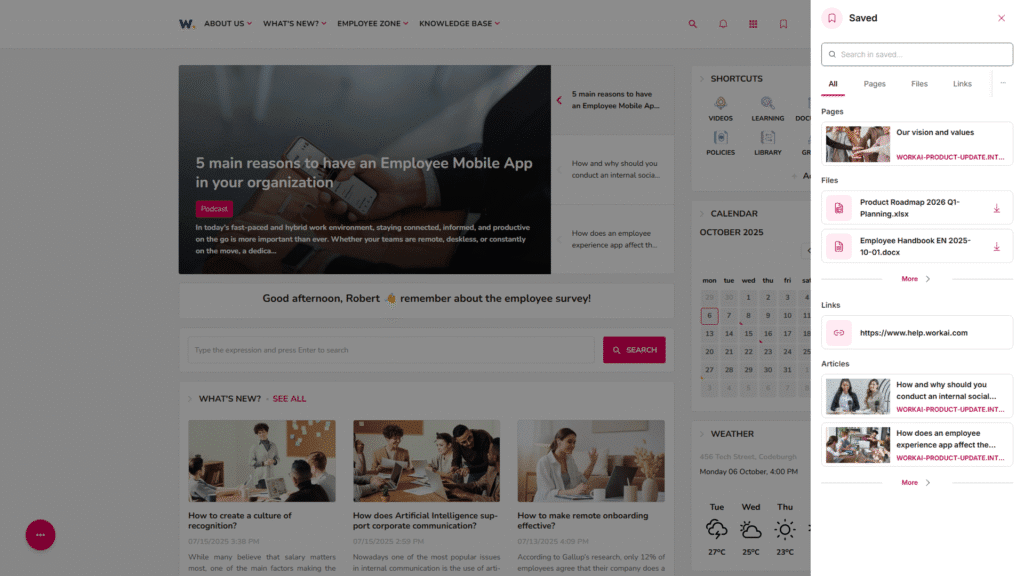
Description: We’ve introduced a new Saved Items panel, a centralized space where users can save, access, and organize important content from across the entire WORKAI® platform. Accessible directly from the top navigation bar, this panel makes it easy to bookmark intranet pages, articles, files, links, and even contact profiles, all without leaving the current page.
The feature replaces the former “Favorites” with a more unified and intuitive solution that supports fast filtering and search. Whether you’re collecting useful materials, frequently accessed documents, or simply want to keep key links handy, the Saved Items panel is designed to support your daily work.
For example, an employee preparing for a product launch can quickly bookmark relevant procedures, creative assets, and stakeholder contacts, and come back to them at any time, from any page, with just one click.
This improves productivity and focus by reducing time spent searching for frequently used items. It also introduces a more cohesive experience across modules, with upcoming enhancements like custom categories and tags for even greater personalization.
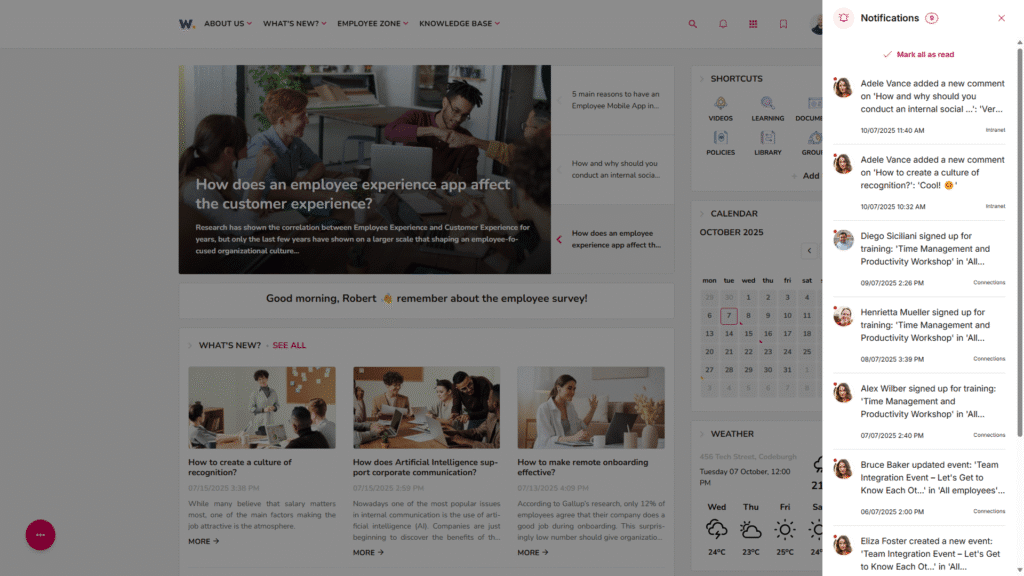
Unified notifications with refreshed design
For whom: All users
Use case: Managing favorite and frequently used content in one easy-to-access location.
Description: We’ve addes a new Saved Items panel, a centralized space where users can save, access, and organize important content from across the entire WORKAI® platform. Accessible directly from the top navigation bar, this panel makes it easy to bookmark intranet pages, articles, files, links, and even contact profiles, all without leaving the current page.
The feature replaces the former “Favorites” with a more unified and intuitive solution that supports fast filtering and search. Whether you’re collecting useful materials, frequently accessed documents, or simply want to keep key links handy, the Saved Items panel is designed to support your daily work.
For example, when an employee is preparing for a project kickoff can save a set of relevant guidelines, team contacts, and shared resources in one place, and instantly refer back to them at any time during the project, without jumping between pages or tools.
This improves productivity and focus by keeping important content just a click away. It reduces time spent searching for frequently used materials and creates a more seamless experience across different modules of the platform. In upcoming updates, users will also be able to create custom categories, making the Saved Items panel even more tailored to individual needs.
Smarter content list
For whom: Administrators, Editors, Publishers, and Readers
Use case: Displaying dynamic content lists with better layout, faster loading, and flexible presentation options.
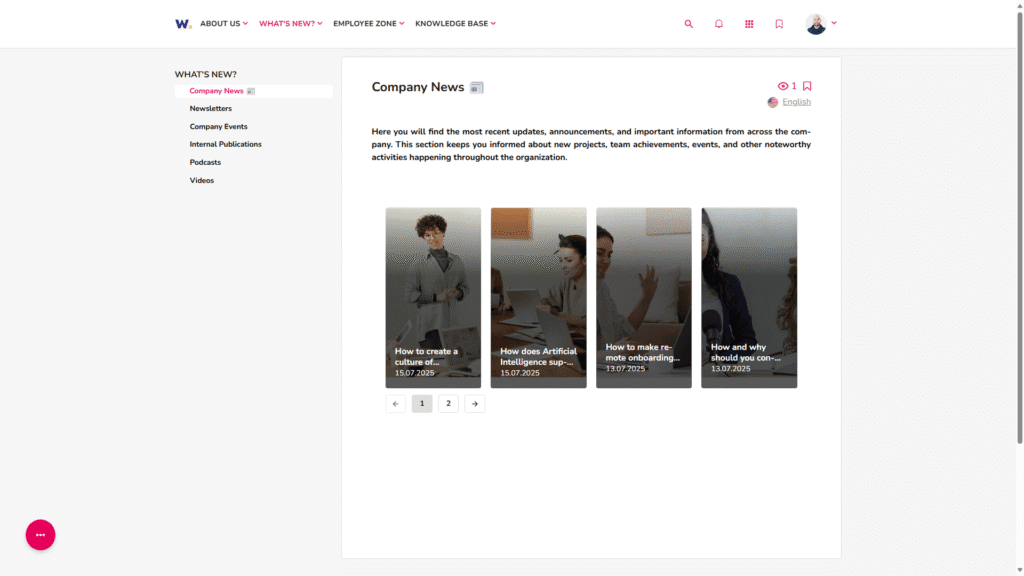
Description: We’ve introduced a completely new List of Content 3 block that brings real-time content updates, faster performance, and new visual layouts to the WORKAI® Intranet. The updated block allows pages to load instantly and reflect live changes without needing to reload – making content management feel effortless and modern.
New display modes include a horizontal carousel view for compact, scrollable item presentation, and a portrait (9:16) layout ideal for showcasing videos or visual content in an eye-catching way. Editors can also customize titles with icons, providing greater control over the design and context of each list.
I.e., an internal communication team can use the carousel view to highlight the latest articles on the homepage, while the portrait layout helps HR promote training videos in a more visually engaging format, all updated in real time.
This improves the overall intranet experience by making content easier to browse, faster to update, and more visually appealing – while reducing the need for technical adjustments. All existing content lists are automatically upgraded, ensuring every intranet page benefits from these enhancements right away.
Smarter & up-to-date search results
For whom: All users
Use case: Instantly finding the most relevant and up-to-date content across the platform.
Description: We’ve made WORKAI®’s search smarter (and more useful) by combining AI-powered semantic relevance with a new content freshness ranking. This means that search results now prioritize not only what matches your query best, but also what’s most current.
Whether you’re looking for the latest HR policy, a newly published article, or updated onboarding materials, you’ll find it faster – without digging through outdated content.
For example, an employee searching for “benefits” will now see the most recent policy updates at the top, rather than older, potentially obsolete pages – keeping everyone aligned with the latest information.
This improves productivity and decision-making by helping users stay informed and act on the most up-to-date resources – all surfaced through a smarter, more relevant search experience.
Note that in upcoming updates, search will become even more connected across all WORKAI® modules, including Intranet, Knowledge, Tasks, and Learning, offering a truly unified discovery experience.
Personalized homepage pop-ups
For whom: Administrators
Use case: Delivering relevant homepage messages to selected users or groups.
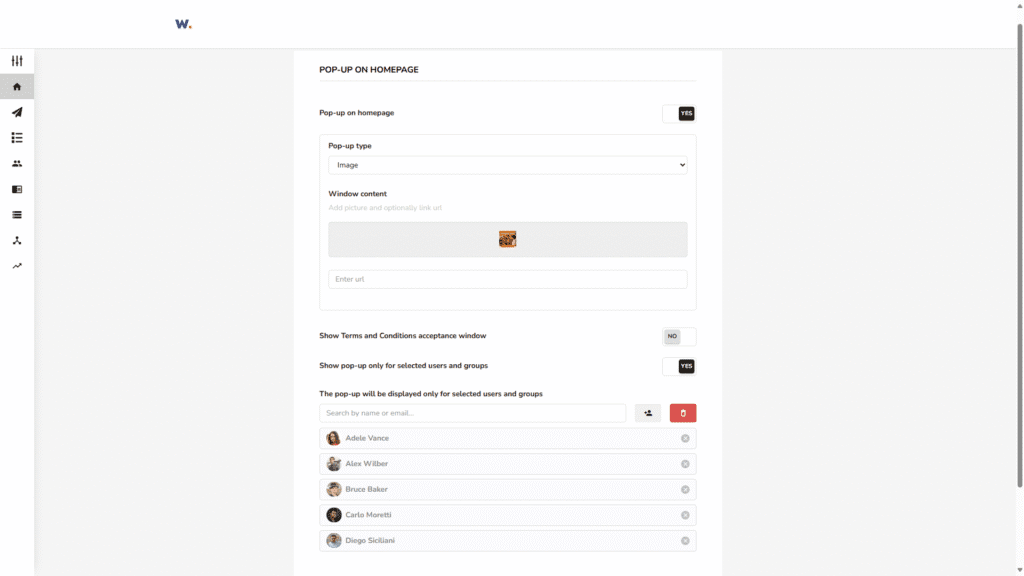
Description: We’ve introduced personalized pop-up windows on the homepage, giving administrators full control over who sees each message. This means that instead of broadcasting every announcement to everyone, admins can now target specific audiences, ensuring communication stays relevant and non-intrusive.
Targeted pop-ups can be used to deliver important updates, reminders, or campaigns directly to the right people, right where they work. Each message appears in context, improving visibility without cluttering the intranet experience.
For example, HR can display onboarding information only to new employees, while IT can share maintenance notifications with selected departments.
This improves internal communication by making it more focused, engaging, and effective. Employees see only what matters to them, while administrators can manage and measure their communication efforts with precision. In upcoming updates, pop-ups will also support scheduling and page-specific targeting for even greater flexibility.
Automatic Glossary block sorting
For whom: Administrators, Editors, and Publishers
Use case: Keeping glossary items automatically organized and easy to navigate.
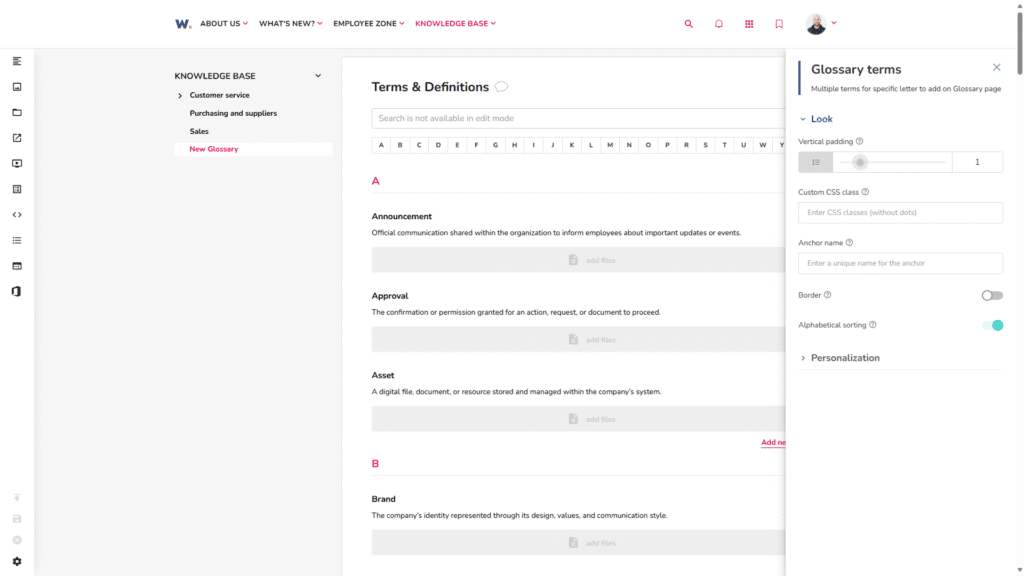
Description: We’ve added automatic alphabetical sorting to the Glossary block, so all terms now stay neatly structured, without any manual work. This ensures that even as new terms are added or edited, the glossary remains clean, consistent, and easy to browse.
For example, when editors update internal definitions or add new abbreviations, the list automatically reorders itself, keeping everything logically arranged for readers.
This improves usability and efficiency by helping employees find the right definitions faster while saving administrators and editors time on manual maintenance. It’s a small enhancement that makes knowledge management smoother and more intuitive for everyone.
Search count in the Most Searched Words widget
For whom: All users
Use case: Understanding which topics or terms are most frequently searched in the organization.
Description: We’ve implemented a simple but powerful insight to the Most Searched Words widget – visible search counts. Now, users can see exactly how many times a given term has been searched across the platform.
For example, if “vacation policy” or “onboarding checklist” appears with high search volume, it signals what information employees are actively looking for.
This improves transparency and helps communication, HR, or content teams better respond to employee needs by identifying trends and filling knowledge gaps. It’s also a great way for individuals to discover what’s top of mind across the company.
Consistent look for the Embedded Feed block
For whom: All users
Use case: Ensuring a visually unified experience when embedding Connections content.
Description: We’ve improved the Embedded Connections Feed block by adding support for labels – styled and formatted to match the standard Connections view. This update ensures that embedded posts look cleaner, more structured, and fully aligned with the rest of your platform design.
For example, when an internal communication team adds an embedded feed to the HR homepage to highlight employee initiatives, the labels (like #wellbeing or #teamnews) now display just as they do in the main Connections module, keeping the visual language and structure consistent across different touchpoints.
This improves consistency across modules, enhances readability, and helps maintain a polished, professional look on pages where Connections content is shared, whether it’s the homepage, a department hub, or a campaign landing page.
More flexible task assignment in WORKAI® Mobile
For whom: All users
Use case: Choosing between assigning one shared task to multiple users or creating individual tasks for each person.
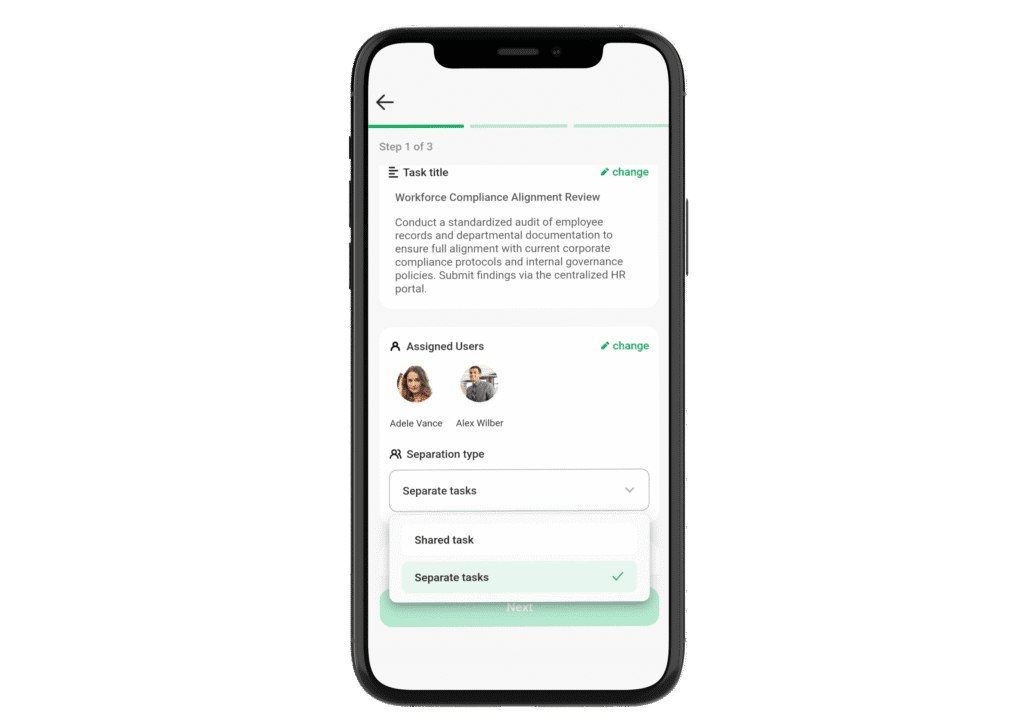
Description: Managing tasks on the go just got more powerful. The WORKAI® Tasks mobile app now supports assigning tasks to multiple users, either as a single, shared responsibility or as separate, individual to-dos.
This feature, previously available only in the web version, brings greater flexibility to mobile task management and supports different collaboration styles, whether you’re distributing responsibilities evenly or tracking individual progress.
For example, a manager preparing for a store audit can assign one shared checklist to the whole shift team, or choose to create individual versions for each employee, all from their phone, no matter where they are.
This improves team coordination and accountability, especially for mobile-first or deskless employees. It allows leaders to quickly adapt task assignment based on the nature of the work and the team’s preferred way of collaborating, all while keeping everything streamlined within the mobile experience.
Mobile moderation of posts and comments
For whom: All users and Administrators
Use case: Reporting inappropriate or concerning content directly from the mobile app.
Description: Moderation doesn’t have to wait until you’re back at your desk. With the latest update, WORKAI® Mobile now lets users report both posts and comments in Connections — directly from their phone.
Whether it’s a post that violates internal guidelines or a comment that needs attention, reporting is just a tap away. Each report is automatically sent to the Feedback list, where administrators can track, review, and take action as needed.
For example, if a frontline employee spots a comment that seems off-topic or inappropriate, they can instantly flag it for review, without interrupting their workflow or switching devices.
This improves safety, accountability, and responsiveness in internal communication, giving everyone a simple way to support a healthy and respectful digital workplace.
From AI-powered term explanations and the WORKAI® Assets module with centralized file management, to smarter content lists, personalized pop-ups, and flexible task assignments on mobile, every Q4 update was designed to make your daily work easier, faster, and more intuitive. Whether you’re an administrator looking to simplify governance, an editor managing content across teams, or an employee trying to stay organized on the go, the WORKAI® platform continues to grow with you.
And we’re not stopping here. In the coming months, you can expect even deeper AI integrations, improved personalization options, and more cross-module features that bring the entire WORKAI® ecosystem even closer together.
Have feedback or ideas for what we should build next? We’d love to hear from you.