


Enterprise Search for the Digital Workplace: what changes in 2026
Enterprise Search for the Digital Workplace has become one of the defining capabilities of modern intranet platforms. In 2026, the success of a digital workplace is no longer defined by the number of features it offers. It is defined by one critical factor: how fast employees can complete a search for company knowledge and information.
The ClearBox Intranet and Employee Experience Platforms 2026 report is clear – search has become a true “make or break” scenario. In an era of constant information overload, employees are not searching for files. They are searching for clarity. They want to know what to do, what decision to make, and what the context is – immediately.
In the Information Finding and Search scenario, Workai receives a strong 4/5 rating, placing it among the market leaders. ClearBox describes the experience as “powerful and intuitive,” emphasizing the unique combination of structured search and conversational AI.
This is where the shift becomes visible. Workai does not treat search as a keyword field. It treats it as the primary interface between employees and organizational knowledge. The philosophy can be summarized simply: Information should find the employee, not the other way around.
What does this mean in practice?
If search is now the critical point of the intranet, differences between platforms are no longer cosmetic. They are strategic. ClearBox 2026 shows that many systems still build value around extensive feature sets. Workai builds value around outcomes: fast access to the right answer.
In Workai, search is not based on keyword matching – it is based on intent understanding.
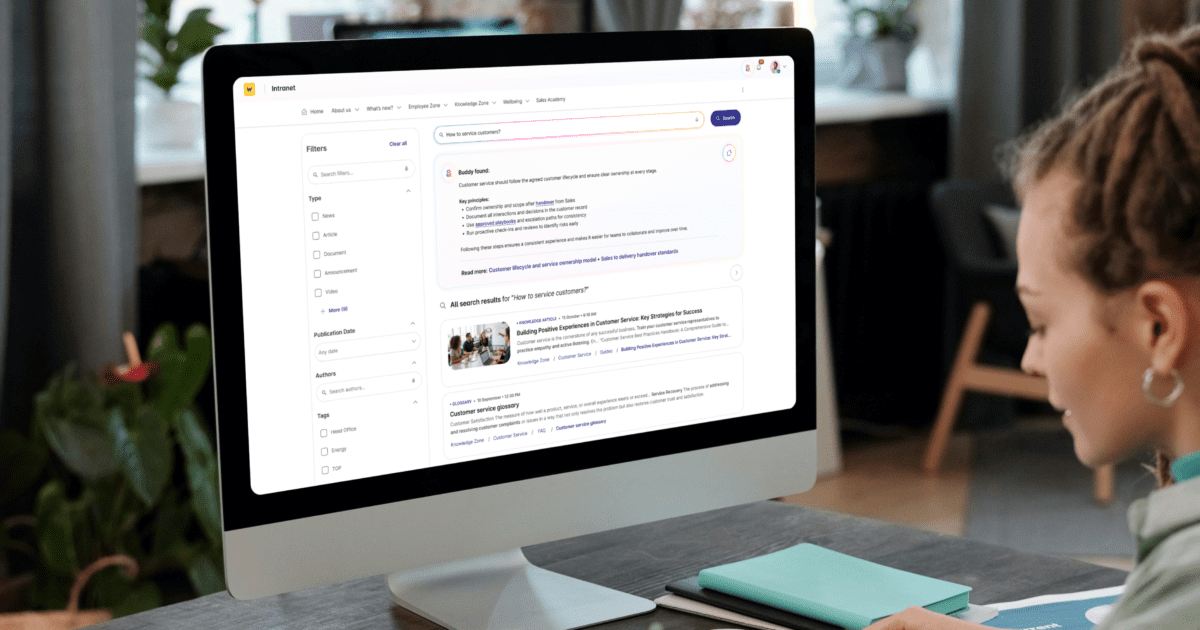
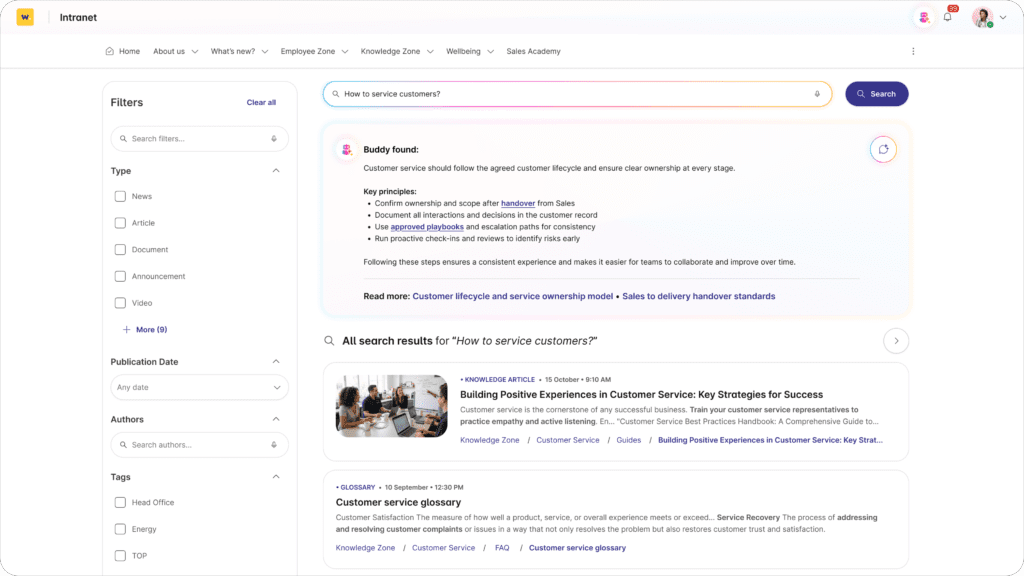
ClearBox analysts note that the search results page has a clear and intuitive layout with a list of results prominently displayed, an AI-generated summary at the top, and filters on the left-hand side of the page. From the AI summary, it’s easy to switch to the AI assistant via one click and start an interaction in a side panel.
With AI-powered Search, the system analyzes the meaning behind the query. A question like “who is responsible for marketing?” leads to specific people and relevant context, not to a list of documents containing the word “marketing.” A query such as “how do I expense a business trip?” returns the current procedure along with a concise summary of key steps, not an archive of outdated files.
Workai Buddy adds a conversational layer. At the top of the results page, users see an AI Summary, and they can ask follow-up questions in the side panel. Search becomes a dialogue, not a one-time click.
This model, built on understanding and synthesis, becomes the benchmark for comparison.
Workai vs. Unily: simpler architecture means more effective search
Unily is often perceived as an enterprise-class solution for large organizations. However, the ClearBox report points out its steep learning curve and highly complex CMS, which can overwhelm administrators.
The challenge is not just complexity. The more layered and sophisticated the system, the greater the risk that content structure becomes inconsistent. And inconsistent structure directly affects search performance. Even the best search engine cannot compensate for chaotic data.
Workai takes a different approach. Its modular architecture and more structured content model reduce technical overhead and complexity. Less structural weight means better control over information quality.
The result? Search works faster not because it has more options, but because it operates on cleaner, better-managed data.
Workai vs. Omnia: stability that protects search quality
Omnia is built natively on SharePoint. While this provides deep Microsoft 365 integration, it also means inheriting the full update cycle of the platform.
And that directly impacts search.
Every major SharePoint update can affect indexing methods, access permissions, or component behavior. In practice, this creates the risk of temporary disruptions, lower result relevance, or reconfiguration needs. The moment an employee enters a query becomes less predictable.
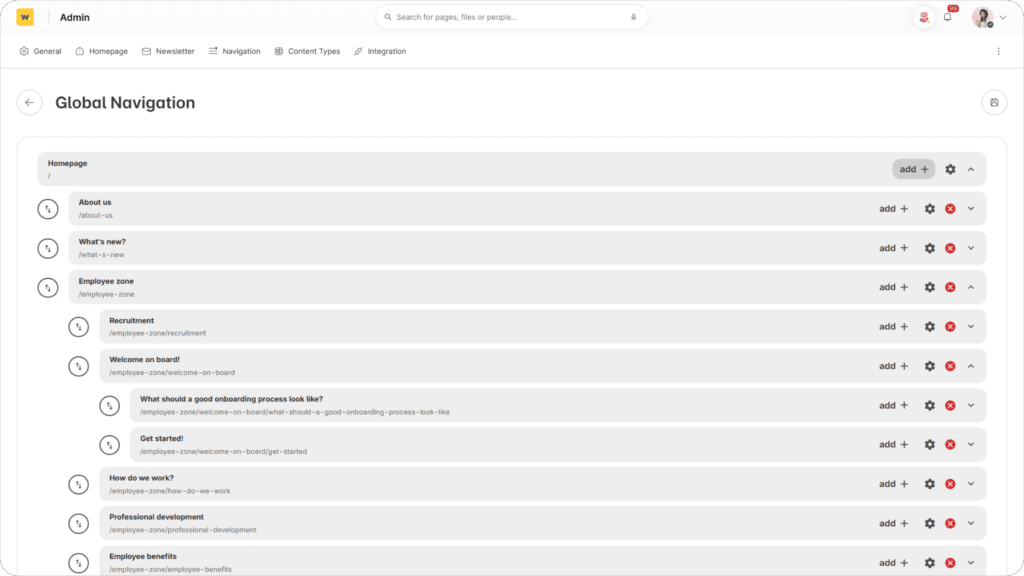
Workai operates as a standalone system. It does not modify native SharePoint templates nor rely on injected code for search logic. Its indexing, ranking, and presentation mechanisms remain stable regardless of Microsoft-side updates.
This “update-proofness” translates into something tangible: consistent and predictable search performance.
And in a “make or break” scenario, predictability determines whether employees trust the system — or return to asking colleagues on Teams.
Workai vs. LumApps: better content quality equals better search results
LumApps offers broad capabilities, but ClearBox notes that page creation can be complex for less frequent publishers. In practice, this often limits publishing to a narrow group of administrators or external partners.
That directly impacts search.
When publishing is complicated, content is created less frequently, becomes outdated more quickly, and lacks structural consistency. And search engines are only as effective as the data they index.
Workai lowers the entry barrier. Its drag-and-drop editor simplifies page structure, while the AI Content Assistant analyzes text in real time, flagging unclear language, contextual gaps, and readability issues before publication.
The result? More consistent, up-to-date, and semantically structured content. And that translates into more relevant search results, stronger contextual suggestions, and fewer “where was that again?” questions. Search does not begin in the search bar. It begins at the moment content is created.
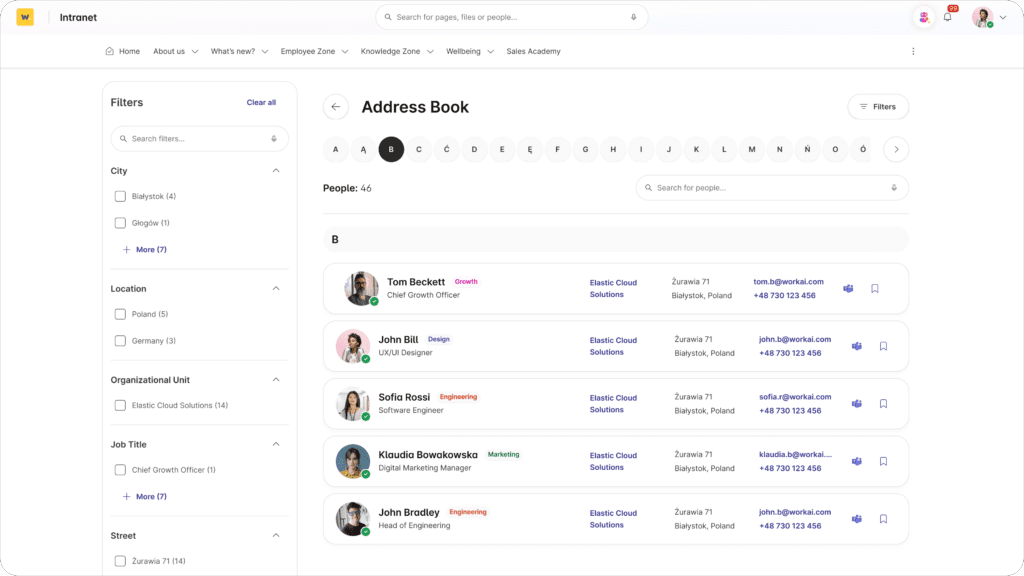
The ClearBox report emphasizes that „a well-designed address book allows searching in a contextual search box, from an A–Z list, or by applying filters to drill down further”.
Workai vs. Interact: knowledge quality control instead of a document archive
Interact offers mature content management tools, but its knowledge base templates are described as simpler compared to some competitors.
In the context of search, the mere presence of documents is not enough. What matters is their relevance, completeness, and context. If content is outdated, ambiguous, or duplicated, search begins to return multiple similar results, leaving users uncertain.
Workai approaches this differently. The Content Vitality dashboard does not only measure reach — it analyzes content “health.” It identifies outdated materials, missing definitions, competing articles within search results, and inconsistencies requiring consolidation.
This is a preventive approach. Instead of organizing chaos only after users lose trust in search, Workai safeguards information quality proactively. And the healthier the knowledge base, the more precise and reliable the search results.
Search is not a standalone feature, it is the outcome of overall content system quality.
Workai vs. Atlas: automation instead of taxonomy engineering
Atlas requires foundational groundwork. A carefully designed taxonomy and information architecture are prerequisites for effective system performance. In practice, this means months of workshops, structural design, and manual data organization before search becomes truly useful.
This approach assumes that the world must be perfectly structured before it can be searched.
Workai prioritizes pragmatism. Instead of building teams of “structure guardians,” it leverages AI for automatic tagging, topic detection, and intelligent linking between articles. The system suggests definitions, connects context, and fills informational gaps autonomously.
The impact is visible in search results. Even without perfect manual taxonomy, users still receive relevant answers, related materials, and contextual information. Search performance does not depend on flawless editorial discipline.
Organizations do not need a documentation revolution to achieve effective search. Knowledge begins organizing itself in the background, and the moment of asking a question stops being a gamble.
ClearBox experts points that „the usage of AI in the product is thoughtful and effective, lifting the content creation and search experiences to a higher level”.
Workai vs. Microsoft Search: consistency instead of fragmentation
Microsoft 365 offers powerful search capabilities. The issue is not performance, it is consistency.
In practice, results are fragmented across Teams, SharePoint, and Viva. Users are redirected to different interfaces, layouts, and logic structures. Microsoft Search rarely provides a direct answer within the results page. Instead, it directs users to locations where answers must still be found. It is a subtle but crucial difference.
Workai functions as an experience layer over Microsoft 365. It integrates SharePoint content via API without injecting code or altering structure. As a result, it maintains stability while presenting results within one cohesive interface.
Users do not have to decide whether they are searching in Teams, documents, or the organizational directory. They search in one place. This is particularly visible in people search. In standard Microsoft 365, users receive a basic contact card. In Workai, they access a dynamic directory with advanced filters — searchable by skills, projects, or location.
In the scenario of “who can help me with this?”, this is not a detail. It shortens the distance between question and solution. And in that consistency, Workai builds its advantage — not by replacing Microsoft, but by organizing the search experience beyond its fragmentation.
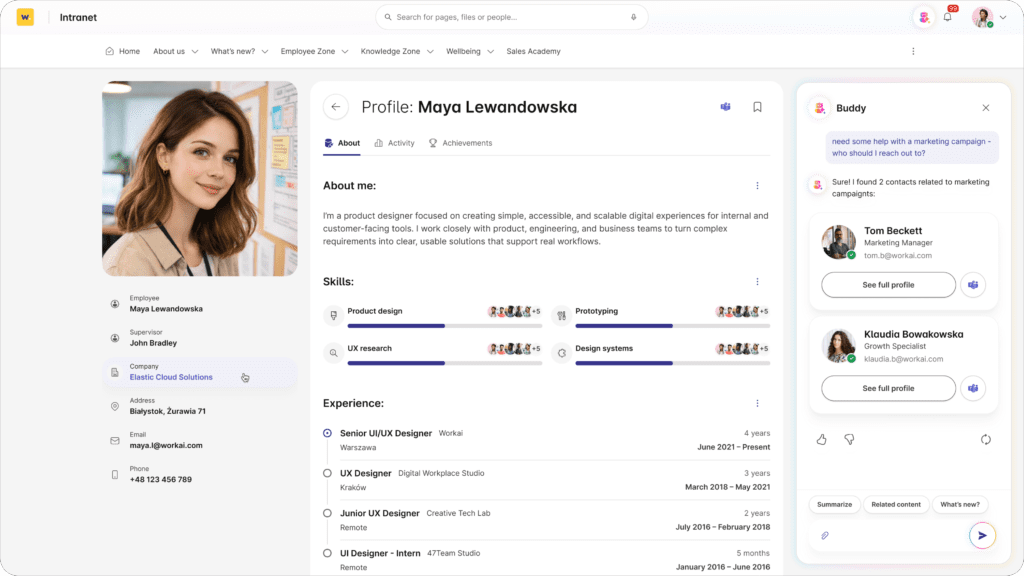
ClearBox experts highlight that “Information about employees is presented in a clear and attractive layout, and the AI assistant ‘Workai Buddy’ is a useful alternative to traditional search for finding employees.”
In 2026, the problem is not the lack of information. The problem is that organizations are drowning in information they cannot use at the right moment.
Every system can store something. Many systems can retrieve something. Few systems ensure that answers appear precisely when needed, in a format that can be immediately applied.
And this is where the difference lies. If architecture is too heavy, search suffocates under its own complexity. If systems depend on external updates, response timing becomes unpredictable. If content creation is difficult, information quality declines and search returns chaos. If knowledge “health” is not maintained, users see five similar results and no certainty. If everything depends on perfect taxonomy, one mistake can break the mechanism.
Workai does not attempt to win by feature count. It shifts the focus, from functionality to the moment of use. From architecture to experience. From content management to answer effectiveness.
That is why “information that finds the employee” is not a marketing slogan. It is an ambition: to stop searching and start knowing.
Because in the digital workplace, the true currency is not content – it is time. And search is where that time is either recovered, or permanently lost.